
TL;DR
- Trophy launches an open-source gamification UI kit distributed as a shadcn registry.
- The UI kit includes 17 React components for common gamification use cases including streaks, points, achievements and leaderboards.
- The components can be used independently of the Trophy API, but existing Trophy customers will benefit from a first-class integration experience when using the two together.
Trophy has spent the last two years building the data and API layer for streaks, achievements, leaderboards, and points. In that time, every customer we worked with built a similar set of visual components from scratch: streak badges, leaderboard rankings, achievement unlock animations, points charts. The components varied slightly in styling but solved identical underlying problems, and each team was spending time in design and engineering to make them feel polished.
Today we're open-sourcing our gamification UI kit. Seventeen production-ready gamification components for React, distributed as a shadcn registry, MIT licensed, and built to work with Trophy's API or any other gamification backend you happen to use. The full library is at ui.trophy.so and the source code lives at github.com/trophyso/ui.
What's in the library
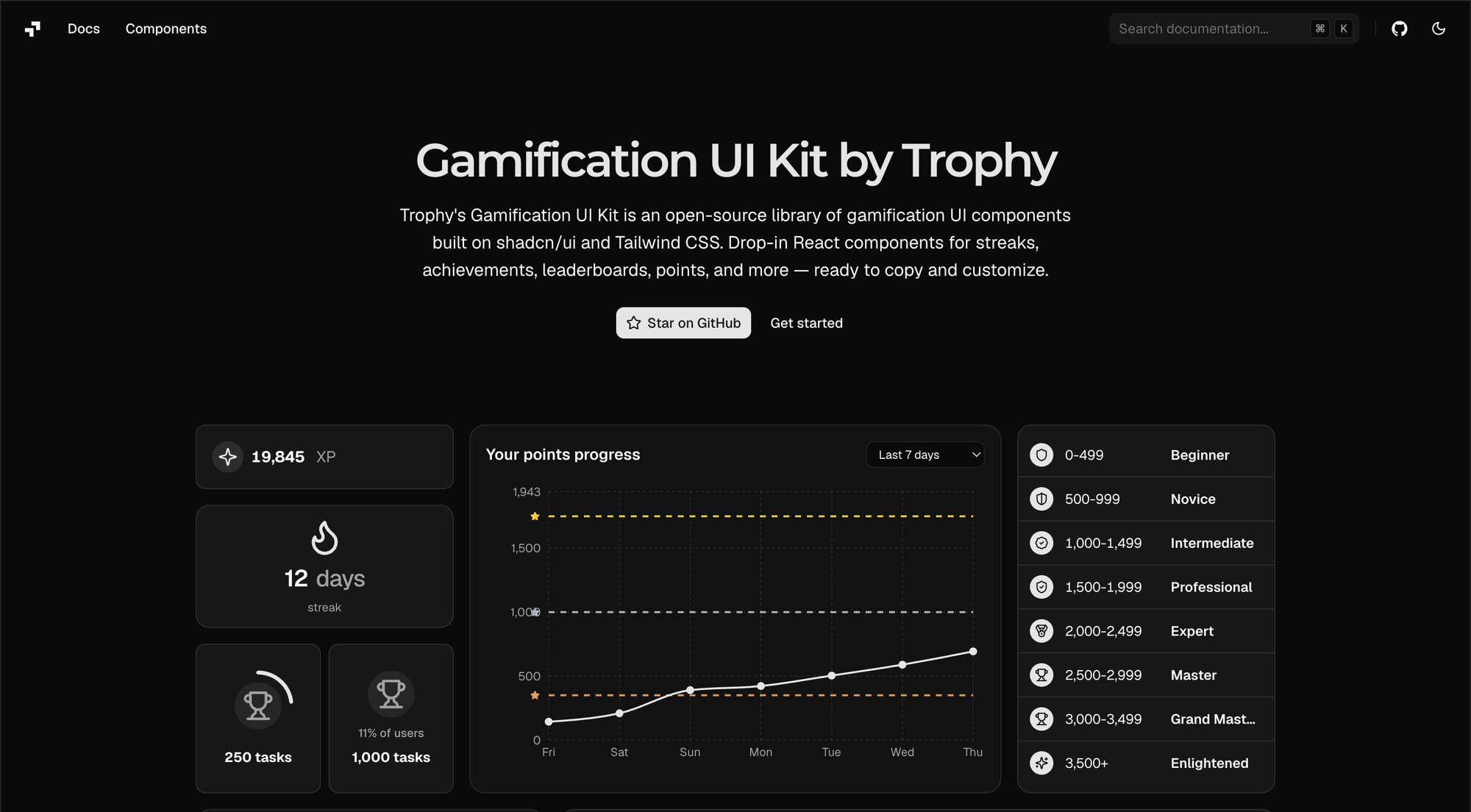
Seventeen components, organised into four families. Each family covers a different gamification primitive, and the components within a family handle the different display contexts that primitive shows up in.
Achievement (5 components): Achievement Badge for compact inline displays, Achievement Card for detailed views with metadata, Achievement Grid for the full collection page, Achievement List for vertical layouts with progress states, and Achievement Unlocked for the celebration moment.
Leaderboard (3 components): Leaderboard Rankings for the full ranked list with avatars, rank changes support for collapsed rows and pagination, Leaderboard Podium for top-three displays, and Leaderboard Card for full elements that show the user's rank in context of the current winners.
Points (6 components): Components for balance displays, history charts, level indicators, and milestone visualisations. This is the largest family because points is the primitive with the most distinct use cases, and therefore common UI patterns vary the most.
Streak (3 components): Streak Badge for header and profile displays, Streak Card for detailed summaries with support for streak freezes, and Streak Calendar for historical weekly, monthly and yearly activity views.
All components share a design language but are themselves independent. You can install one, several, or all of them and customize how you see fit.
Why a shadcn registry
We chose to ship Trophy UI as a shadcn registry instead of a traditional npm package to solve a the dependancy problem that exists in the frontend world right now.
Most React component libraries are imported. You install @some-library/components from npm, import the components you need, and the code runs inside the bundled package in your node_modules folder. If the library ships a breaking change, you upgrade or you don't. If you want to modify a component, you fork the library or you wrap it. The component code isn't really yours.
The shadcn pattern works differently. Installation is a CLI command that copies source code into your project:
npx shadcn@latest add https://ui.trophy.so/streak-badge
After running that command, there's a new file at components/ui/streak-badge.tsx in your project. It's a normal React component. You can read it, modify it, restyle it, fork it, delete parts of it, or replace it entirely. There's no npm dependency tracking the upstream version.
This pattern has been the dominant approach to React component libraries since shadcn/ui itself landed in 2023, and the ecosystem around it has converged on the same model - zero-dependancy, open-code. Until now the gamification category has been underserved, so we're glad to be filling that gap.
Component example: the Streak Calendar
Streaks are the most famous gamification features so we spent time building a Streak Calendar component that supports the most common design patterns that we see large apps follow.
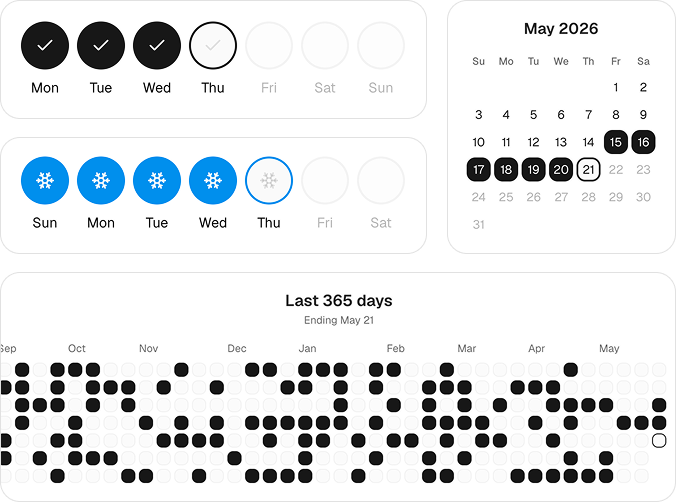
The component supports rendering a week, month or an entire year of streak history, with support for Sunday or Monday week-starts. The component also supports streak freezes on any arbitrary day, replacing the icon and colors on days where streaks are frozen.
Three design decisions in the component are worth flagging because they're the kind of thing that's easy to get wrong:
The component installs with one command and accepts the streak history data from whatever source you're using:
npx shadcn@latest add https://ui.trophy.so/streak-calendar
import { StreakCalendar } from "@/components/ui/streak-calendar"

export function StreakHistoryView({ userId }) {
  const { activeDays, missedDays, freezeProtectedDays } = useStreakHistory(userId)

  return (
    <StreakCalendar
      activeDays={activeDays}
      missedDays={missedDays}
      freezeProtectedDays={freezeProtectedDays}
      timezone="America/Los_Angeles"
    />
  )
}
The useStreakHistory hook here could pull from Trophy's API, from your own backend.
Tech stack
Trophy UI is built on React 18+, Tailwind CSS v4+, and the shadcn/ui base layer. Components use Radix UI primitives where accessibility primitives are needed (modals, popovers, accordions). Styling is achieved through Tailwind classes and shadcn's design token system, which means the components inherit your project's design tokens automatically if you're already using shadcn or Tailwind.
We chose this stack for compatibility reasons - the largest population of developers building consumer React apps in 2026 is already on this combination, and Trophy UI needed to drop into their projects without forcing a stack change.
What we're shipping next
We know a lot of consumer applications are mobile first, so we'll be adding support for common mobile frameworks in future releases as we'll as adding new components based on new design patterns that emerge.
As the UI kit is entirely open-source we welcome contributions from developers.
Getting started
Install any component with one command
npx shadcn@latest add https://ui.trophy.so/{name}
Browse the full set at ui.trophy.so and pick the components that fit your use case. Each component documentation page has a live demo, install command, and code examples.
If you're using Trophy's API for the data layer, the components connect out of the box. If you're using a different backend, the components accept props for the data they render.
The library is free, MIT licensed, and stays in your codebase.
FAQ
Do I need a Trophy account to use Trophy's gamification UI kit?
No. Trophy UI is MIT licensed and works with any data source, including mock data, your own backend, or a different gamification platform. The components don't make API calls to Trophy unless you explicitly wire them to. You can install components, build with them, and ship to production without ever creating a Trophy account.
What's the difference between Trophy's gamification kit and Trophy's SDK?
Trophy SDK is the data layer: clients for Trophy's gamification API, available in most major programming languages. Trophy's gamification UI kit is the visual layer: React components distributed through the shadcn registry. They work well together (the SDK provides the data the UI renders) but they're independent. You can use the SDK without the UI, the UI without the SDK, or both together.
Can I use Trophy's gamification UI kit with a non-React frontend?
Not yet. The library is React-only for now. Trophy's underlying SDK is framework-agnostic, so the data layer is portable to Vue, Svelte, or vanilla JavaScript projects today, but the components are React. We'll be adding support for common mobile frameworks soon.
Is Trophy gamification UI kit free?
Yes. MIT license, no usage limits, no paywall.
What's the relationship between Trophy's gamification kit and shadcn/ui?
Trophy's gamification kit is a shadcn-compatible registry. It uses the same install pattern as shadcn/ui and is designed to compose with shadcn's base components (Button, Card, Dialog, and so on). If your project is already on shadcn, Trophy UI components will inherit your design tokens automatically. If your project doesn't use shadcn, Trophy UI still works, but you'll want to set up Tailwind and the shadcn base layer first.
Get the latest on gamification
Product updates, best practices, and insights on retention and engagement — delivered straight to your inbox.
The gamification layer for consumer apps
Drop-in gamification features you can ship this sprint. Increase retention and user engagement without sacrificing your roadmap.
 Book a call