
The instinct when you need XP to appear consistently on a user's phone, tablet, and web app is to reach for a sync layer. Firebase Realtime Database is the most common answer, and it solves exactly that problem, but the need for a sync layer is a consequence of a particular design choice: treating XP as a value that originates on the client and needs to be propagated outward. Change that choice and the sync problem largely disappears.
This post covers how the Firebase approach actually works, where it creates friction for XP specifically, and how a server-authoritative XP model, where Trophy is the single source of truth and devices simply read from it, handles the same use case with less infrastructure and better security guarantees.
The Firebase Approach
Firebase Realtime Database handles cross-device consistency through WebSocket connections and a client SDK that maintains a local cache. Each connected client subscribes to a node in the database; when any client writes to that node, Firebase pushes the updated value to all other subscribers in real time.
For XP, the typical schema stores each user's total under a user-scoped path:
/users/{uid}/xp: 1250
The client SDK listens to that node and re-renders the UI whenever the value changes:
import { initializeApp } from 'firebase/app';
import { getDatabase, ref, onValue, runTransaction } from 'firebase/database';

const app = initializeApp(firebaseConfig);
const db = getDatabase(app);

// Listen for XP changes — fires on this device and any other connected device
function subscribeToXP(uid: string, onUpdate: (xp: number) => void) {
  const xpRef = ref(db, `users/${uid}/xp`);
  return onValue(xpRef, (snapshot) => {
    onUpdate(snapshot.val() ?? 0);
  });
}

// Award XP for completing a lesson
async function awardXP(uid: string, amount: number) {
  const xpRef = ref(db, `users/${uid}/xp`);
  await runTransaction(xpRef, (current) => (current ?? 0) + amount);
}
Firebase also handles offline correctly: if a device loses connectivity, writes are queued locally and flushed when the connection is restored. For a pure "keep this number consistent everywhere" problem, this is a clean solution. The complications are specific to what XP actually needs to do in a gamified product.
Four Problems the Firebase Model Creates for XP
Business logic has no safe home
XP isn't a number you increment arbitrarily — it's the output of award rules. A lesson earns 10 XP. Completing a 7-day streak earns 50 XP. Finishing an achievement earns 100 XP. During a promotional campaign, all awards are doubled.
Firebase is a data store. It has no concept of award rules. Those calculations have to run somewhere: either in client code or in Cloud Functions triggered by database writes.
Client-side award logic is a security problem. If your app's JavaScript or mobile code decides how much XP to award and writes that value directly to Firebase, any user who can intercept or modify that code can award themselves arbitrary XP. The Firebase security rules are then your only line of defence — and encoding all your award logic in Firebase's declarative rules language is brittle, difficult to test, and easy to get wrong.
Cloud Functions shift the calculation server-side, which is more defensible, but you've now added a function deployment and invocation layer to what started as a simple data sync question. The logic lives in a Cloud Function, the value lives in Firebase, and you're operating two systems instead of one.
No award history
Firebase Realtime Database stores the current state of a node. It does not natively record why that state is what it is — which events fired, when they fired, or what multipliers were active. A user's XP node contains 1,250. What earned those 1,250 points? You don't know without building a separate event log.
Award history matters more than it seems during initial development. Support tickets ("I completed three lessons and didn't get my XP"), cheat detection ("this user's XP jumped by 5,000 in 30 seconds"), annual Wrapped features ("you earned 14,000 XP this year from 280 lessons") — all of these require a complete, ordered record of every award. If you didn't design that in from day one, reconstructing it later from Firebase is painful.
Level and boost logic creates client coordination overhead
Most XP systems aren't just a counter — they have levels (Bronze at 0 XP, Silver at 500 XP, Gold at 2,000 XP) and time-limited boosts (2× XP during a holiday campaign). In the Firebase model, your client code has to know the level thresholds to detect a level-up and trigger the celebration animation. It has to know whether a boost is currently active to display the correct multiplier in the UI. That configuration has to reach every client through some mechanism — another Firebase node, a remote config service, or a hardcoded constant — and stay consistent when it changes.
This is solvable but it's coordination work. Every additional piece of logic that spans both the client and the Firebase database is something that can drift out of sync.
Gaming the system and duplicate awards
Even with server-side award logic in Cloud Functions, a custom Firebase system has no built-in protection against the same action triggering an award more than once. Mobile networks drop requests. Retry logic re-fires them. A user completes a lesson, the request times out on the client, the app retries on reconnect — and if your Cloud Function doesn't explicitly check whether that specific lesson has already been rewarded for that specific user, the award fires twice.
The standard mitigation is to maintain a separate deduplication log: before processing an award, check whether this action ID has been seen for this user, and if so, skip it. This is straightforward to describe and moderately tedious to build correctly — the check and the award need to happen atomically, the log needs to be queryable by (userId, actionId), and you need a retention policy so it doesn't grow unbounded.
Without this protection, determined users can also exploit retry behaviour deliberately — triggering network failures at the right moment to manufacture duplicate completions. XP inflation is the common outcome: the total climbs faster than intended, level thresholds lose their meaning, and the progression system breaks down. This is a problem that grows with your user base, rarely surfaces in testing, and is painful to remediate after the fact.
The sync problem is downstream of the real problem
When you work through what it would take to make Firebase handle XP correctly — Cloud Functions for award calculations, security rules that encode business logic, a separate event log for history, remote config for level thresholds and boost state — you've built a server-side XP system that happens to use Firebase as its storage layer. At that point you're not saving engineering time compared to building XP server-side directly; you're adding Firebase as an extra dependency.
The Server-Authoritative Model
The alternative reframes the problem entirely. Rather than asking "how do I keep XP consistent across devices," ask "what if XP only ever lives in one place, and devices just read from it?"
In a server-authoritative model, no client ever writes an XP value. The client sends an event describing what the user did ("completed lesson 42"). The server applies the award rules, updates the total, and returns the new state. Every device that wants to display XP reads it from the server. There is no distributed state to synchronise — there is one number in one place.
A minimal server-authoritative XP implementation without any third-party tooling looks like this:
// Server-side: award XP and return the new total
async function handleLessonComplete(
  userId: string,
  lessonId: string
): Promise<{ xp: number; levelUp: boolean; newLevel: string | null }> {
  // Award rules live server-side — no client can influence this
  const award = calculateAward(lessonId); // e.g. 10 XP per lesson

  const result = await db.transaction(async (trx) => {
    const user = await trx('users').where({ id: userId }).forUpdate().first();
    const newTotal = user.xp + award;
    const newLevel = resolveLevel(newTotal);
    const levelUp = newLevel !== user.level;

    await trx('users').where({ id: userId }).update({
      xp: newTotal,
      level: newLevel,
    });

    // Write to event log — history is automatic
    await trx('xp_events').insert({
      user_id: userId,
      amount: award,
      reason: 'lesson_complete',
      lesson_id: lessonId,
      total_after: newTotal,
      created_at: new Date(),
    });

    return { xp: newTotal, levelUp, newLevel };
  });

  return result;
}
The client sends a request to your server, gets back the updated XP and level state, and renders it. No Firebase, no sync layer, no distributed state. The "how does the other device find out" question becomes "how does the other device know to refetch" — a simpler problem that polling or a lightweight push notification handles adequately.
Trophy's Implementation
Trophy is a purpose-built server-authoritative XP layer. Rather than building the award logic, level system, history, and boost infrastructure yourself, you configure them in Trophy's dashboard and interact via API.
Sending activity and reading XP inline
When a user completes an action, send a metric event to Trophy from your server. The response includes the updated XP total, current level, and (if the action triggered a level change) the new level object. No separate XP fetch required on the active device:
import { TrophyApiClient } from '@trophyso/node';

const trophy = new TrophyApiClient({ apiKey: process.env.TROPHY_API_KEY });

async function handleLessonComplete(userId: string, lessonId: string) {
  const response = await trophy.metrics.event('lessons_completed', {
    user: { id: userId },
    value: 1,
  });

  const xpData = response.points?.xp;

  if (xpData) {
    // Total XP after this event
    const newTotal = xpData.total;

    // xpData.level is only present when the user's level changed
    // Treat its presence as the level-up signal — no extra bookkeeping needed
    if (xpData.level) {
      triggerLevelUpAnimation(xpData.level.name, xpData.level.badgeUrl);
    }

    updateXPDisplay(newTotal, xpData.level);
  }

  return response;
}
Trophy evaluates all configured triggers on every event — metric-based awards, active boosts, caps — and returns the resulting state. Your server code doesn't need to know the award rules; they live in Trophy's configuration meaning they can be changed easily at any time without code changes.
Fetching current XP on app launch or device switch
When a user opens the app on a different device, fetch their current XP state from Trophy. This is the "sync on open" pattern — no persistent connection, no offline cache to manage:
async function loadUserXP(userId: string) {
  const points = await trophy.users.points(userId, 'xp');

  return {
    total: points.total,
    level: points.level,      // Current level object, or null if no levels configured
    recentAwards: points.awards, // Recent award history
  };
}
Call this on app launch, on tab focus, or whenever the user navigates to a profile or progress screen. The value returned is always current — it's a read from Trophy's database, not a local cache.
Pushing display updates to other active sessions
The points.changed webhook fires when a user's XP balance changes (at most once per user per points system per minute, to avoid flooding high-frequency apps). Wire this to your own real-time push layer (whatever you already use for notifications) to update any other sessions the user has open:
// In your webhook handler
app.post('/webhooks/trophy', async (req, res) => {
  const event = req.body;

  if (event.type === 'points.changed') {
    const { user, points } = event;

    if (points.key === 'xp') {
      // Push the updated total to any other active sessions for this user
      // via your existing WebSocket, SSE, or push notification infrastructure
      await pushToUserSessions(user.id, {
        type: 'xp_updated',
        total: points.total,
        added: points.added,
      });
    }
  }

  if (event.type === 'points.level_changed') {
    const { user, points, previousLevel, newLevel } = event;

    if (points.key === 'xp') {
      // Level-up notification to other active sessions
      await pushToUserSessions(user.id, {
        type: 'level_up',
        total: points.total,
        previousLevel: previousLevel.name,
        newLevel: newLevel.name,
        newLevelBadge: newLevel.badgeUrl,
      });
    }
  }

  res.sendStatus(200);
});
The key difference from Firebase's model: Trophy is the source of truth, and your push layer is only responsible for telling other clients to refresh, not for carrying the XP value itself. The client that receives the push does a loadUserXP() call and renders the current state.
Querying award history
The points summary endpoint returns a time-series breakdown of XP awards for a user. No event log to build:
async function getUserXPHistory(userId: string) {
  const summary = await trophy.users.pointsEventSummary(userId, 'xp', {
    aggregation: 'daily',
    startDate: '2026-01-01',
    endDate: '2026-04-19',
  });

  // Returns a daily breakdown of XP awards — useful for
  // Wrapped features, support investigations, or progress graphs
  return summary;
}
Preventing duplicate awards with idempotency keys
Trophy's metric event API supports idempotency keys natively. Pass an idempotencyKey alongside the event — typically the unique ID of the action being rewarded — and Trophy guarantees the award fires at most once per user per key, regardless of how many times the request is retried.
typescript
async function handleLessonComplete(userId: string, lessonId: string) {
  const response = await trophy.metrics.event('lessons_completed', {
    user: { id: userId },
    value: 1,
    // Using the lesson ID ensures this award can only fire once
    // per user per lesson, no matter how many retries occur
    idempotencyKey: lessonId,
  });

  // response.idempotentReplayed is true if this key was already seen for this user
  // The response still reflects current state — safe to render regardless
  if (response.idempotentReplayed) {
    console.log(`Duplicate event for lesson ${lessonId} — no award processed`);
  }

  return response;
}
When Trophy receives a request with an idempotency key it has already seen for that user and metric, it returns a 202 Accepted response with idempotentReplayed: true. No metric is incremented, no points are awarded, no achievements are completed — the state is unchanged. The response still reflects the user's current state, so the client can render it safely without needing to branch on whether the event was replayed.
The key should reflect the granularity of uniqueness you want to enforce. A lesson ID prevents a user from earning XP from the same lesson twice, ever. A session ID would allow multiple completions of the same lesson across different sessions. The choice of idempotency key is the business rule — Trophy enforces whatever you specify.
Abstracting XP logic away from code
The difference with Trophy's server-authoritative XP model is that business logic around how to award XP to users based on interactions lives outside your codebase. This means it can be changed at any point without code changes, so product managers can optimize without bottlenecking developers with small logic tweaks.
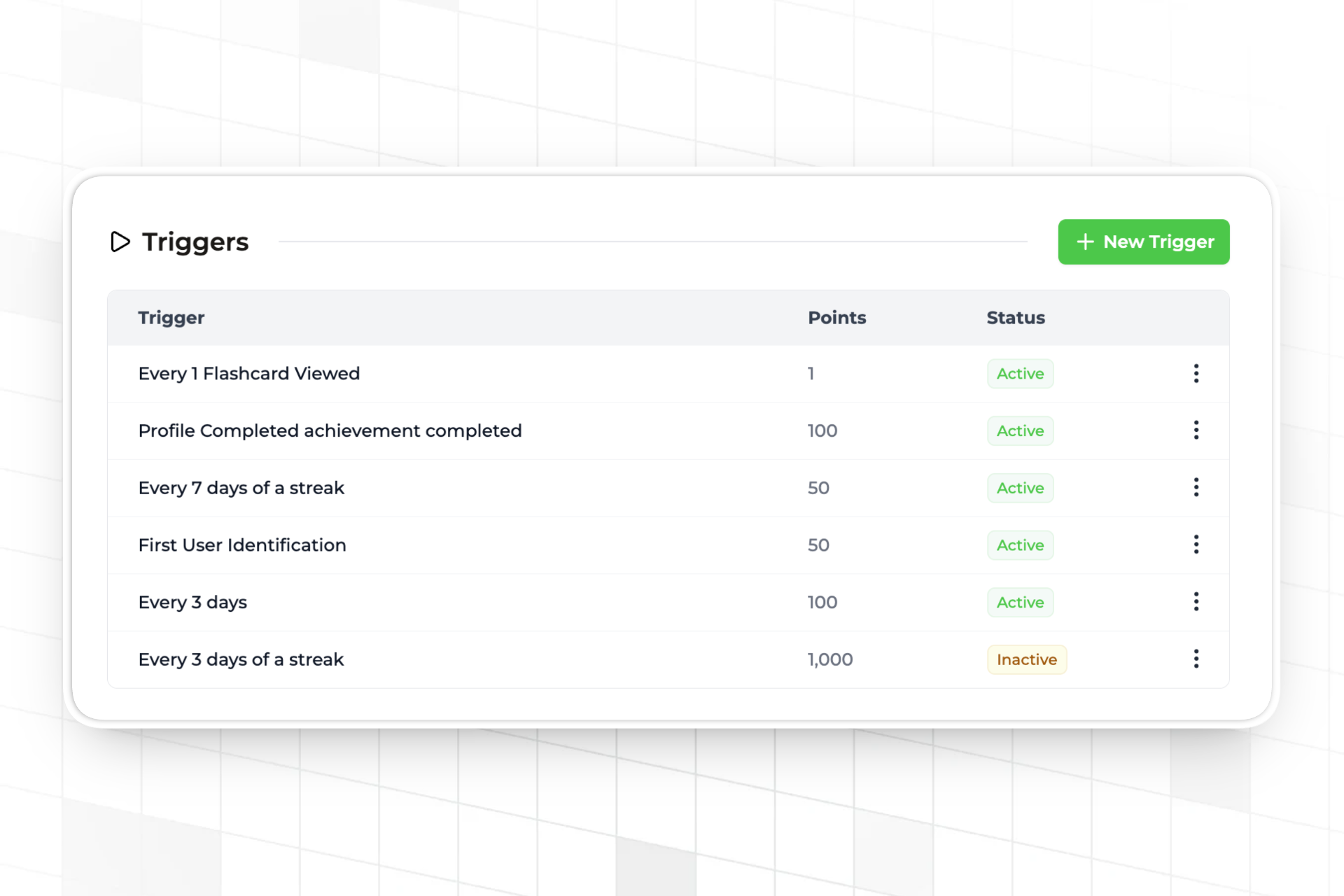
Trophy has a system of triggers for different types of XP awards including:
- Interaction driven triggers e.g. 10XP per flashcard viewed
- Streak triggers e.g. 10XP per day of streak
- Time triggers. e.g. 5XP per hour
- Achievement triggers e.g. 50XP for completing a profile
- One-time triggers e.g. 100XP on sign up
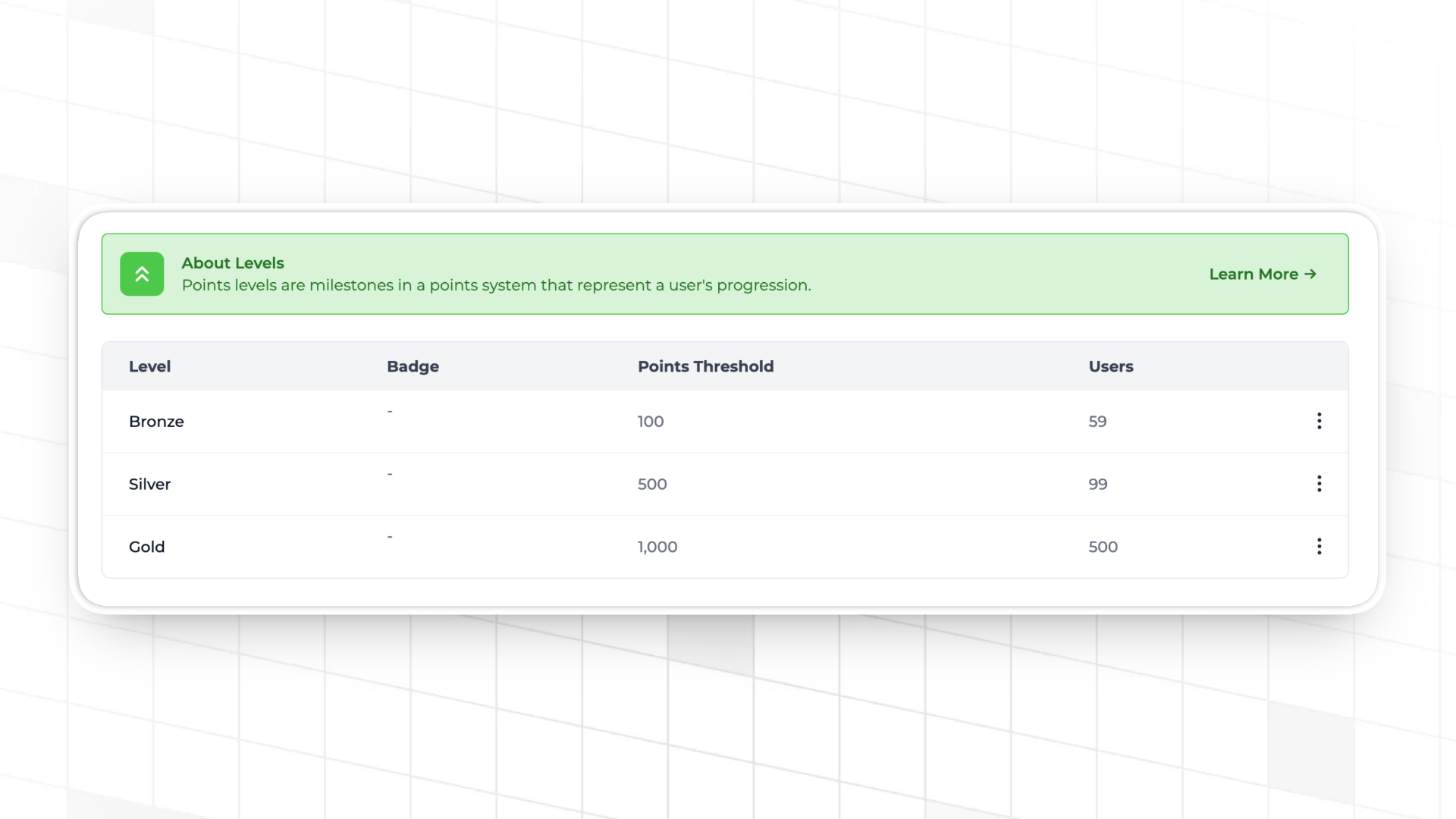
Additionally, Trophy natively supports setting up levels through the dashboard, allowing easy balance changes and optimizations without code changes.
Finally, Trophy also supports adding time-limited 'boosts' to points logic during key periods such as Christmas, NY and BFCM. This allows product teams to modify poitns logic temporarily around key calendar events, again without creating extra work for developers.
What You're Not Building
The server-authoritative model with Trophy means the following are handled without custom code: award calculation and rate configuration, level threshold evaluation and assignment, boost multiplier stacking and scheduling, XP cap enforcement, and a complete per-user award event log. Each of those would be engineering work in the Firebase model — either in Cloud Functions, security rules, or additional database tables.
The one thing Trophy doesn't replace is your real-time push layer for notifying other active sessions. If you already have WebSockets, SSE, or FCM in your stack for other features (chat, notifications, collaborative activity), you use that. If you don't have anything, polling on focus events is a straightforward fallback — loadUserXP() on visibilitychange or app foreground keeps every session current without a persistent connection.
For the full configuration reference including trigger types, level setup, and boost management, see Trophy's Points documentation. If you're building out the full XP feature including UI patterns for progress bars and level displays, How to Build an XP Feature covers the end-to-end implementation. And if you're also connecting XP to a leaderboard, How to Build a Leaderboard for Your App covers how Trophy's points rankings work.
FAQ
Does Trophy push XP updates to other devices in real time?
Trophy fires the points.changed webhook when a user's XP balance changes, which you can use to trigger a push to other active sessions via your existing real-time infrastructure. Trophy doesn't maintain a persistent WebSocket connection to your clients directly — it notifies your server, and your server notifies the relevant clients. For apps without real-time infrastructure, polling on app foreground or page focus is a practical alternative that keeps sessions current without a persistent connection.
What if my app needs to work offline — can users earn XP without a connection?
Trophy's metric events are sent from your server, not the client, so offline XP earning requires queuing actions on the client and flushing them to your server when connectivity is restored. The pattern is: client stores completed actions locally, syncs to your server on reconnect, your server sends the batched events to Trophy in order, Trophy computes the awards. This is the same pattern you'd need with any server-authoritative system. The advantage over Firebase is that conflict resolution is trivial — Trophy processes events in the order received and applies award rules consistently, so there's no merge conflict to handle on reconnect.
How does Trophy handle the level-up moment across devices?
The metric event response includes the level key in the points map only when the user's level changed as a result of that event — its presence is the level-up signal, so no comparison logic is needed on the active device. For other sessions, the points.level_changed webhook fires separately from points.changed, giving you a clean hook to trigger level-up notifications or animations on any other open sessions without having to diff XP totals.
Can I migrate existing XP data from Firebase to Trophy?
Yes. The approach is to backfill Trophy with metric events that reconstruct each user's current XP total, then cut over new activity to Trophy once the backfill is complete. If your Firebase data includes a history of individual awards (separate from the running total), those can be replayed as individual events to preserve the history in Trophy's audit log. If you only have the current totals, you can use Trophy's Admin API to set initial balances directly before going live. Contact Trophy's team for guidance on large-scale migrations.
Is Trophy's points system only for XP, or can it handle multiple currencies like gems or coins?
Trophy supports multiple independent points systems per app. You can configure a separate system for each currency — XP, gems, coins, energy — each with its own triggers, level thresholds, caps, and boost schedules. Each system has its own key (e.g. xp, gems), and the metric event response returns updated totals for every system that changed as a result of the event. A single action can simultaneously award XP to one system and deduct energy from another, with both results returned inline in the same response.
Get the latest on gamification
Product updates, best practices, and insights on retention and engagement — delivered straight to your inbox.
The gamification layer for consumer apps
Drop-in gamification features you can ship this sprint. Increase retention and user engagement without sacrificing your roadmap.
 Book a call