
Wednesday is the highest-loss day for streaks, accounting for 21.1% of all breaks — more than any other weekday — with Friday next at 18.5% and Sunday lowest at 6.7%, according to Trophy's Gamification Intelligence Report 2026. That's a single-day concentration nearly twice what you'd expect from random distribution. It's also the clearest signal in our data for why streak reminder emails live or die on three specific decisions: when they fire, who gets them, and what they know about the user's current state.
This post covers the parts that go wrong when teams build streak reminders in-house, the Trophy primitives that handle them natively, and the decisions behind the defaults.
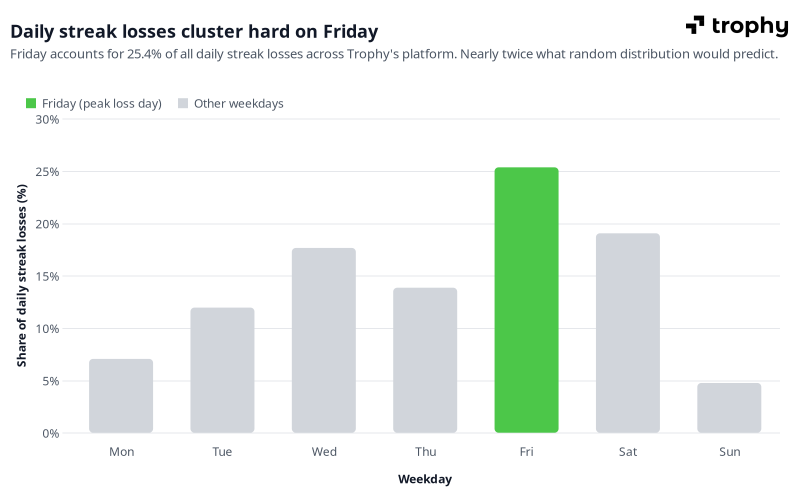
| Weekday | Loss share (%) |
|---|---|
| Monday | 7.07 |
| Tuesday | 12.04 |
| Wednesday | 17.74 |
| Thursday | 13.91 |
| Friday | 25.35 |
| Saturday | 19.07 |
| Sunday | 4.83 |
Source: Trophy platform data, April 2026. Distribution of daily streak losses by weekday, across all apps on Trophy's platform. Calculated on users with active daily streaks longer than three days at the time of loss.
The naive approach
The default instinct when building streak reminder emails is to stitch together three things: a database query that finds users with active streaks at risk of expiring, a scheduled job that runs on a fixed cadence, and an email service that delivers the actual message.
A lot of teams don't have the time-series user interaction data required to calculate streaks. But for those who do, in code that typically looks something like this:
// Runs on a cron at 20:00 UTC
const atRiskUsers = await db.query(`
  SELECT u.id, u.email, u.timezone, s.current_streak_length
  FROM users u
  JOIN streaks s ON s.user_id = u.id
  WHERE s.current_streak_length > 0
    AND s.last_extended_at < NOW() - INTERVAL '20 hours'
`);

for (const user of atRiskUsers) {
  await sendgrid.send({
    to: user.email,
    from: company.email,
    templateId: "d-streak-reminder",
    dynamicTemplateData: {
      streakLength: user.current_streak_length,
    },
  });
}
Compressed like this, it looks tractable: one join, one loop, one send. The query gets more complex in production, the schedule gets more nuanced, and the template gets more conditional, but the shape stays roughly the same.
What this shape doesn't handle is everything that makes the difference between a streak reminder that works and one that actively reduces retention.
Why the naive approach breaks in production
The failure modes cluster into four categories, all of which we see regularly when customers migrate to Trophy from in-house systems.
Race conditions around extension. A user opens the app at 7:59 PM local time, does the thing that extends their streak, closes the app. The cron job runs at 8:00 PM UTC, queries for at-risk users, finds them (because the last_extended_at field was still stale in the read replica), and sends a reminder for a streak they already extended. The user opens the email, sees "Don't lose your streak!", and loses trust in the product at the same moment the reminder was meant to reinforce it. This happens more often than teams expect, because the window between extension and send is exactly when users are most active.
Timezone drift. A user identifies as Europe/London, then flies to Tokyo for two weeks. The reminder logic is still using the stored London timezone, so they're getting reminders at 4 AM local. The streak logic is also still using London midnight as the rollover point, which means from the user's perspective the streak resets at a seemingly random time during the afternoon. Neither problem is technically unsolvable, but the solution requires knowing when a user's effective timezone has changed, and re-syncing it on every session is work most teams never get around to.
Reminder fatigue and the Friday cliff. A reminder that fires daily at the same UTC moment regardless of user context teaches users to ignore it. More usefully: daily streak losses cluster hard toward the end of the working week (see the weekday distribution above), and a one-size-fits-all reminder schedule misses that concentration entirely. Friday users need the reminder earlier and harder than Tuesday users. Users who have freezes available don't need an emergency reminder at all; they need a gentler nudge, because their streak is actually protected.
Deliverability and domain management. Streak reminders are transactional enough that they need reliable delivery but frequent enough that they can damage sender reputation if mishandled. SPF, DKIM, DMARC, bounce handling, list hygiene: these are full-time concerns for teams that send meaningful volume, and they're inherited the moment you decide to send any emails at all.
Each of these is solvable with enough engineering time. The question is whether solving them is the best use of the team that's supposed to be building the core product.
The Trophy approach
In Trophy, sending streak reminder emails is two pieces of work: identify the user with their timezone and track streaks through Trophy's streak API, and design and activate a streak email template. Trophy handles all streak calculations automatically. All timezones and all edge cases are covered.
Identification happens wherever you're already tracking user activity. If you're incrementing a metric when the user completes their core action, you can identify them inline on the same call:
import { TrophyApiClient } from "@trophy/sdk-node";

const trophy = new TrophyApiClient({ apiKey: process.env.TROPHY_API_KEY });

// On any user action that should extend a streak, send event to Trophy, which automatically tracks streaks
await trophy.metrics.event("flashcards-flipped", {
  user: {
    id: user.id,
    email: user.email,
    tz: user.timezone, // IANA identifier, e.g. "Europe/London"
  },
  value: 1,
});
The timezone is the key piece. Trophy uses it for streak calculations, leaderboard rankings, and the send timing of every email type. On the browser side, fetching the current timezone is one line:
const timezone = Intl.DateTimeFormat().resolvedOptions().timeZone;
Capture that on each session and pass it into the user object on the next metric event. Trophy handles the rest server-side: tracking which users have active streaks at risk, in which timezones, with which freeze counts available automatically. When the reminder logic fires, it fires per-user and in the user's local clock.
The email template itself is designed in the Trophy dashboard. The block-based editor supports conditional rendering (show different content based on user state), smart blocks for things like current streak length and recent history, and email variables for personalisation in both the subject line and body.
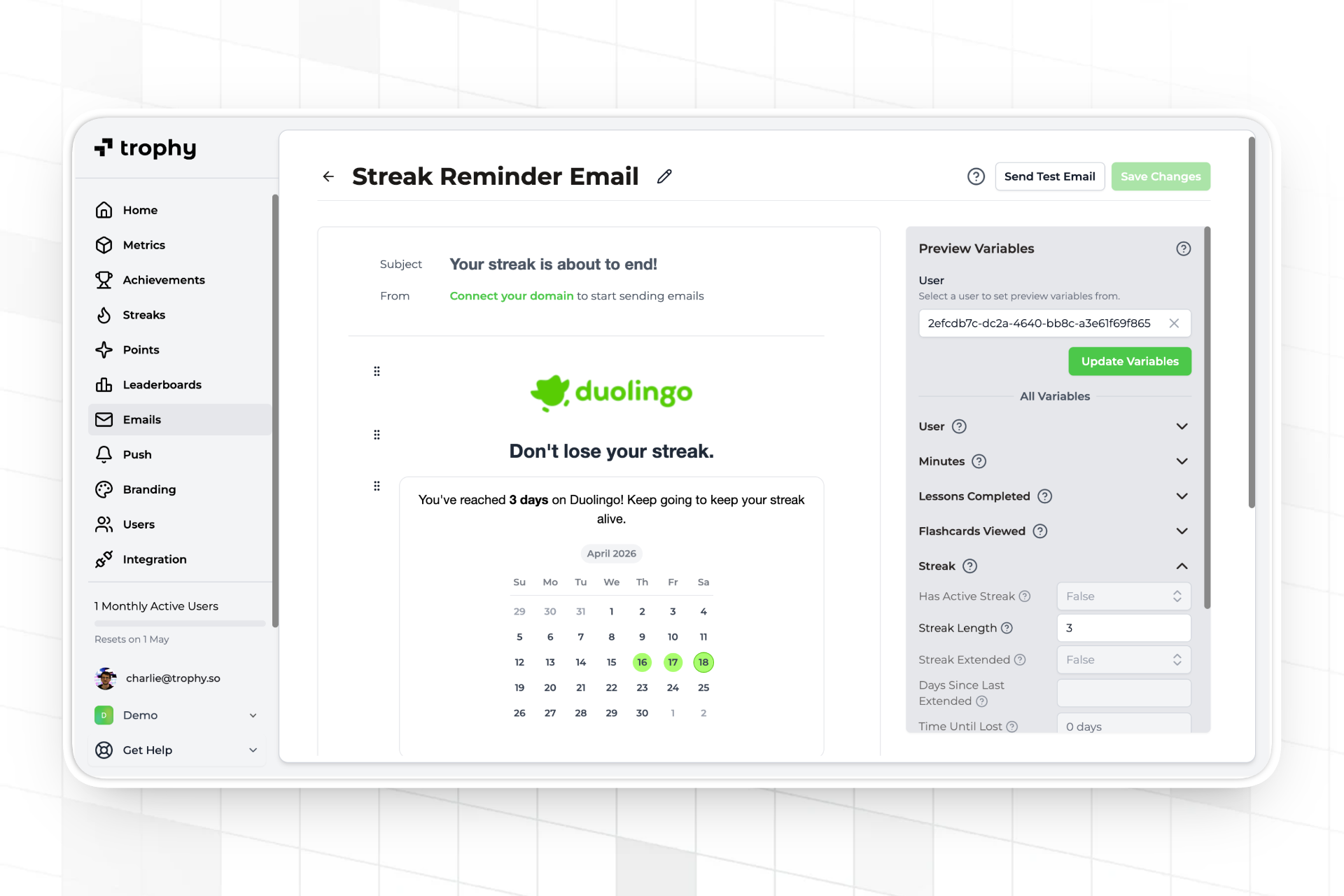
Activate the template, and the send logic Trophy has already built takes over.
The comparison with the naive code is deliberate. The engineering work that made the naive approach brittle — the timezone handling, the race condition prevention, the freeze awareness, the deliverability setup — is all still happening. It's happening inside Trophy, refined across every customer app where it runs, and maintained by a team whose full-time job is the streak engine.
The decisions behind the default
A few defaults are worth explaining, because they encode opinions about what makes streak reminders work that would otherwise need to be reverse-engineered.
Daily streak reminders fire four hours before the end of the day in the user's timezone. Early enough to give the user real time to act, late enough that the reminder feels relevant rather than premature. The four-hour window has held up across enough app categories to make it the default. It's also configurable: the dashboard exposes the send timing directly, so teams with genuinely different rhythms (for example, apps where most usage happens in the morning) can override it.
Weekly streak reminders fire on Friday morning. This is the direct response to the Friday cliff in the platform data. Weekly-streak users need to know before the weekend whether they need to act, which means the reminder has to land on a day they're still checking work-adjacent email. Sending on Saturday, the next most likely loss day, is already too late for the cohort that forgets until Monday.
Reminders skip users who have already extended. Trophy's send logic checks current streak state at send time, not at query time. A user whose streak was extended twenty minutes before the reminder was scheduled will not receive it, because the state check happens after the template is prepared, not before. This eliminates the race-condition failure mode entirely. The cost of the additional check is borne by Trophy, not by the customer's infrastructure.
Users in unknown timezones default to Eastern Time. When the tz field isn't set on a user, Trophy defaults to Eastern Time for send scheduling. This is a pragmatic default rather than a correct one. The correct approach is to identify every user with their actual timezone, which the Intl API snippet above makes approximately free on the first session after sign-up.
FAQ
What timezone does Trophy use if I haven't identified the user with one? When the tz field isn't provided on a user, Trophy defaults to Eastern Time for both streak calculations and email send timing. This is a pragmatic default rather than a correct one. The correct approach is to identify every user with their actual timezone, which can be pulled from the browser with one line of JavaScript and passed in on the first metric event for that user.
Can I send reminder emails only to a specific user segment? Yes. Every email template in Trophy can be scoped to users with specific custom attribute values. If you've defined a plan attribute with values free and pro, you can create two different streak reminder templates (one for each plan), and each will only send to users matching that attribute. This is the right place to handle segmentation rather than filtering at the database level, because it also means the segmentation logic stays in one place as the template evolves.
What happens when users turn off email notifications? Trophy respects a per-user subscribeToEmails flag, and also exposes a user preferences API for more granular controls. When a user opts out through a preference center in your app, setting that flag through the SDK removes them from all email types until they opt back in. The check happens at send time, so there's no risk of a reminder going out in the window between the opt-out and the next sync.
How do I customise the email content and subject line? The email builder in the Trophy dashboard supports full template design: copy, subject line, smart blocks for streak history and progress charts, conditional blocks for showing different content based on user state, and email variables for personalisation. Subject lines support the same variables as the body, which is useful for making the subject line specific to the user's current streak length or time since last activity.
What domain do reminders send from? Trophy supports sending from your own domain out of the box. For production use, DNS verification lets you configure a full sending subdomain with DKIM and Return Path records, which gives you the benefit of your existing domain reputation and the best deliverability. Single Sender Verification is available for faster setup during development, which verifies a single email address without requiring DNS changes.
Can reminder emails include in-app deep links? Yes. The button block in the email builder accepts a URL, and that URL can include any user-specific parameters you want, including attribute values passed through as variables. A common pattern is to link the main call-to-action button to a deep link that opens the app directly on the relevant screen, with the user's current streak length and expiry time encoded as query parameters for in-app display.
Conclusion
Streak reminder emails are the last 5% of the streak system, not a separate infrastructure concern. If the streak logic underneath them knows each user's timezone, freeze state, and extension status in real time, the reminder itself becomes a toggle and a template. If it doesn't, the reminder becomes an ongoing maintenance burden that competes with the core product for engineering time, and one that breaks in ways that erode the trust the streak was designed to build.
For the full set of Trophy's streaks APIs and email configuration options, the streaks platform documentation and emails platform documentation cover every setting referenced here.
Get the latest on gamification
Product updates, best practices, and insights on retention and engagement — delivered straight to your inbox.
The gamification layer for consumer apps
Drop-in gamification features you can ship this sprint. Increase retention and user engagement without sacrificing your roadmap.
 Book a call